Baileys ban risk: how WhatsApp detects & bans unofficial bots (2026 update)
The Problem: Your Bot Stopped Working Overnight
You set up your WhatsApp bot. Chose OpenClaw, n8n, or built something custom. Everything running smoothly with Baileys or WAHA for months. Then one morning, messages stop arriving. You check the logs: reconnect loop. You try to reauthenticate: QR code won’t load. You open WhatsApp on your phone and see the notification no one wants to see:
“Your WhatsApp account has been banned for violating the Terms of Service.”
No prior warning. No appeal. Your production number, customer contacts, conversation history — all gone. If you were using a personal number, you can’t even create a new account with that number now.
This scenario is becoming increasingly common. Not because people are spamming or behaving maliciously, but because they’re using unofficial WhatsApp APIs like Baileys, Evolution API, or WAHA in environments that expose automation patterns. This article explains technically why bans happen, how detection works, and what the safe alternative is if you need to connect AI agents or automations to WhatsApp.
Ready to migrate? Read our production cutover guide: Migrate from Baileys to WhatsApp Cloud API without downtime — covers dual-run architecture, webhook setup, session handoff, and rollback strategy.
What Is Baileys and Why Does It Exist
Baileys is a community-maintained TypeScript library that reverse-engineers WhatsApp Web’s multi-device protocol. Instead of using Meta’s official API (WhatsApp Cloud API), Baileys emulates the behavior of a linked device — like when you scan a QR code in WhatsApp Web on your browser.
How it works technically:
When you use Baileys, your Node.js server behaves like a “companion device” linked to your personal WhatsApp account. It negotiates encryption keys with WhatsApp servers, maintains a persistent WebSocket connection, and serializes/deserializes messages using WhatsApp’s Protocol Buffers protocol.
The library exists because WhatsApp’s official API was historically difficult to access. Until 2018, only large enterprise providers could use the official API. Independent developers, small agencies, and automation hobbyists had no alternative — so Baileys and similar libraries (like Venom, whatsapp-web.js) emerged to fill the gap.
Projects that use Baileys:
- Evolution API: REST API wrapper around Baileys to build bots without writing TypeScript code
- WAHA (WhatsApp HTTP API): Another REST wrapper that supports multiple engines including Baileys
- Plugins for OpenClaw, n8n, and other automation frameworks: Most community WhatsApp integrations use Baileys under the hood
Baileys works for testing and low-volume personal projects. But the fundamental architecture — reverse-engineering a proprietary protocol and emulating an unauthorized device — creates structural risks that cannot be worked around with better configuration.
Why Bans Happen: Technical Detection Mechanisms
Meta doesn’t ban accounts randomly. They use automated detection heuristics that identify patterns of unauthorized automation. When you use Baileys in production or any scenario that exposes your server, several signals trigger these heuristics.
How WhatsApp Detects Baileys and Unauthorized Bots
Before diving into specific violations, it’s critical to understand how Meta’s detection actually works. WhatsApp’s anti-automation systems combine multiple signals — protocol fingerprinting, behavioral analysis, and network scanning — to identify accounts that violate terms of service.
The detection stack:
-
Protocol fingerprinting — Baileys emulates WhatsApp Web’s multi-device protocol, but small differences in handshake timing, user agent strings, and encryption key negotiation reveal it’s not a real browser or mobile device.
-
Behavioral anomalies — Real humans don’t respond to messages in 50 milliseconds. They don’t maintain 24/7 WebSocket connections. They don’t send perfectly structured markdown replies every time. Machine learning models trained on billions of legitimate conversations can spot bot patterns statistically.
-
Reconnection storms — When Meta updates the WhatsApp Web protocol (which happens regularly without public notice), Baileys instances enter reconnect loops until library maintainers reverse-engineer the changes. This creates spikes of frantic reconnection attempts from the same account — a clear signal of unauthorized automation.
-
Public endpoint correlation — If you expose Baileys on a public IP (QR code pages, REST APIs, admin panels), Meta can scan the internet for known patterns (Evolution API routes, WAHA response structures) and correlate server IPs with WhatsApp accounts making requests from those IPs.
-
Multi-device inconsistency — WhatsApp’s legitimate multi-device protocol expects devices to have consistent metadata (OS, browser version, device model). Baileys generates device info that doesn’t match real WhatsApp installations. For example: a “device” that claims to be Chrome 120 on Windows but doesn’t exhibit Chrome’s exact TLS fingerprint.
The ban trigger isn’t single-signal. Meta doesn’t ban you the moment you connect Baileys. But as you accumulate detection signals — days of 24/7 connection, instant bot-like replies, exposed public endpoints, reconnect loops after protocol changes — the cumulative score crosses a threshold. Then the ban is instant and irreversible.
This is why some Baileys bots run for months or years without issues, then suddenly get banned. It’s not random luck — it’s that they finally accumulated enough anomaly signals to cross Meta’s detection threshold.
1. Direct Terms of Service Violation
Section 3.4 of WhatsApp’s Terms of Service explicitly prohibits:
“the use of unauthorized or modified clients”
Baileys is not an authorized client. It was not built by Meta, does not use the official API, and does not go through any review process. Using Baileys with a personal WhatsApp account directly violates terms of service, regardless of whether you’re spamming or not. Even a polite bot that only responds to messages still violates policy.
As of January 2026, Meta also tightened rules around general-purpose chatbots. Bots that perform business-operation tasks (customer support, order tracking, FAQs) are allowed under the Business API. But the enforcement net has widened — personal accounts running automation are now an explicit detection target.
2. Reconnect Storms After Protocol Changes
Baileys depends on reverse engineering. When Meta updates the WhatsApp Web protocol — and they do this regularly, without public announcements — Baileys can stop working until the maintainers update the library.
During this compatibility gap, Baileys instances enter reconnect loops: they try to connect, fail, wait, try again. This frantic reconnection pattern is a strong signal of unauthorized automation. Legitimate WhatsApp Web devices don’t behave this way. They reconnect gracefully or give up after a few tries.
If you’re running multiple Baileys instances (e.g., one bot per customer in a SaaS product), they can all enter reconnect storms simultaneously when a protocol changes, creating an even more obvious abnormal traffic pattern.
3. Multi-Device Fingerprinting and Anomalous Behavior
WhatsApp’s multi-device protocol uses fingerprinting to identify devices. When you link a new device, WhatsApp records:
- User agent and browser metadata (for WhatsApp Web)
- Device identifiers (for mobile apps)
- Connection patterns (IP, session duration, usage times)
Baileys emulates these characteristics, but not perfectly. For example:
- Inconsistent user agents: Baileys versions may report user agent strings that don’t match actual Chrome or WhatsApp Web releases.
- Session duration: A real linked device (your laptop) might connect a few hours per day. A Baileys bot runs 24/7 with continuous WebSocket connection.
- Response speed: A bot responds in milliseconds. A human on WhatsApp Web takes seconds or minutes.
Meta’s machine learning systems can detect these anomalies. They don’t need to understand Baileys’ code — they just observe behavior that’s statistically unlikely for a human-operated device.
4. Exposed Ports and Public Endpoints
This is one of the most underestimated risk signals. Many Baileys, Evolution API, and WAHA deployments expose HTTP or WebSocket ports publicly on the internet:
- QR code endpoints: Public web pages for scanning QR codes (e.g.,
http://your-ip:8080/qrcode) - Inbound webhooks: REST endpoints to send messages or trigger actions
- Admin panels: UIs to manage sessions
When you expose these ports publicly, your server becomes visible in internet scans. Meta can:
- Scan the internet for known patterns: Evolution API routes, WAHA response structures, etc.
- Correlate server IPs with accounts: If your server IP makes Baileys requests and also responds on known bot ports, the correlation is direct.
Additionally, public endpoints create security risks. Anyone who finds your endpoint can hijack your session, send messages in your name, or exfiltrate conversation data. Security vulnerabilities in unaudited Baileys wrappers are well-documented in the community.
5. Using Personal Number as Production Bot
WhatsApp’s official API requires a business phone number registered through WhatsApp Business Platform. Personal numbers cannot register as API accounts.
When you use Baileys, you link automation to a personal WhatsApp account — the same account you might use for personal conversations. This creates contradictory patterns:
- Human conversational traffic (messages to friends, family) mixed with bot traffic (instant responses, structured formatting)
- Messages sending from a laptop during the day and from a cloud server 24/7
- Messages originating from different geographic regions (your phone is in São Paulo; your server is in Virginia)
Meta didn’t design personal accounts to support automation use cases. When a personal account starts looking like a bot, it gets flagged.
Community Evidence: GitHub Issue Baileys #1869
A long-running thread on the Baileys repository (Issue #1869) documents dozens of banned account cases. Common patterns:
- Bots running for 2–3 years without issues, then suddenly banned
- Mass bans after WhatsApp Web releases
- Accounts flagged shortly after exposing public endpoints
- No communication or appeal process from Meta
These aren’t isolated anomalies. They reflect systemic detection that’s getting stricter over time, not more tolerant.
What Is WhatsApp Cloud API
The WhatsApp Cloud API is Meta’s official platform for developers to send and receive WhatsApp messages programmatically. It launched in 2022 as part of Meta Business Platform and replaces the older BSP-hosted (Business Solution Provider) API.
Architectural differences from Baileys:
- Graph API endpoint: Instead of emulating a WhatsApp Web device, you make HTTP requests to
graph.facebook.com/v21.0/{phone-number-id}/messages. - Business number registration: You register a phone number through WhatsApp Business verification flow, not by linking to a personal account.
- Official webhooks: Meta sends incoming messages to the webhook URL you configure, with signature validation.
- No session maintenance: You don’t maintain a persistent WebSocket connection. Each message is a stateless HTTP request.
Key features:
- Template messages: For proactive messages outside open conversations (e.g., order confirmations, reminders). Must be pre-approved by Meta.
- Session messages: Within a 24-hour window after a user sends a message, you can send free-form replies.
- Quality rating: Meta rates your number based on user block/report metrics. Low ratings throttle your message rate.
- All media types: Text, images, videos, audio, documents, stickers, location, interactive lists, buttons.
- Group support: Separate API for group messaging (availability depends on access tier).
Cost difference:
Cloud API has conversation-based pricing. As of 2026:
- User-initiated conversations: First 1,000 per month are free; after that, approximately $0.005–$0.09 per conversation depending on country.
- Business-initiated conversations: Template messages cost $0.02–$0.15 per conversation.
For low-volume bots (hundreds of conversations per month), the cost is minimal. For high volume, the cost is predictable and scalable — unlike Baileys, where the “cost” is the risk of losing your account.
Tech provider vs managed bridge:
To use Cloud API directly, you register as a Tech Provider with Meta — a process that can take weeks and requires business verification. Alternatively, you use a managed bridge provider like Pipes.bot, which is already registered and exposes a simple WebSocket/webhook interface. This way, you skip Meta onboarding and start sending messages in minutes.
Detailed Comparison: Baileys vs Official Cloud API
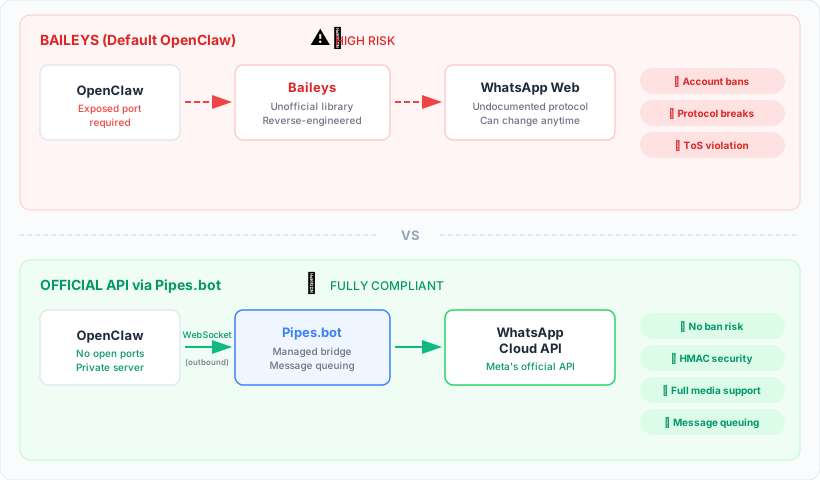
| Factor | Baileys / Evolution / WAHA | WhatsApp Cloud API (via Pipes.bot) |
|---|---|---|
| ToS compliance | ❌ Violates WhatsApp Terms of Service | ✅ Fully compliant |
| Ban risk | ⚠️ High and increasing — no appeal | ✅ None — uses official infrastructure |
| Number type | Linked personal WhatsApp account | Registered business number |
| Port exposure | ⚠️ Most deployments expose HTTP/WebSocket publicly | ✅ Outbound-only WebSocket connection, no open ports |
| Protocol breakage | ⚠️ Can break on any WhatsApp Web update | ✅ Versioned API with deprecation notice |
| Media support | ⚠️ Partial, depends on library version | ✅ Complete — all official types |
| Message reliability | ⚠️ No queuing; if your server drops, messages are lost | ✅ Queuing up to 100 messages |
| Webhook security | ❌ Most deployments don’t validate signatures | ✅ Mandatory HMAC validation |
| Group support | ⚠️ Functional but risky | ⚠️ Depends on API tier (limited for bot use) |
| Rate limits | ❌ Undocumented; burst behavior can trigger detection | ✅ Clear limits based on quality rating |
| Cost | Free (but risk of losing production number) | Paid: plans start with activated pool numbers + conversations |
| Provider onboarding | Not required | Required (but skipped if you use a bridge like Pipes.bot) |
| Multi-number | One instance per number, separate instances | Multiple numbers per account |
| Operational auditability | ❌ No official metrics, dashboard, or logs | ✅ Delivery metrics, quality rating, webhook logs |
Summary: Baileys is technically free, but the real cost is operational risk. You might run for months without issues — until you can’t. Cloud API has a financial cost, but it removes the ban risks, protocol breakage, and security exposure that Baileys carries structurally.
How to Avoid the Ban: The Risk-Free Path
If you’re building anything that depends on WhatsApp — personal AI agent, business automation, customer support bot — don’t place your stack on a foundation that violates terms of service. Here’s how to migrate to a compliant architecture.
1. Stop Using Unofficial APIs for Anything Important
If you’re using Baileys, Evolution, or WAHA for a weekend personal project, the risk might be acceptable. But if you’re:
- Connecting a number you use for personal or business conversations
- Building a SaaS product where customers depend on WhatsApp
- Running automation that supports business operations (support, sales, scheduling)
…then migrate to the official API. The downtime of a ban is far more expensive than the cost of API conversations.
2. Never Expose Baileys Session Ports Publicly
If you absolutely must use Baileys (e.g., for local development), never expose your endpoints publicly:
- Don’t open HTTP/WebSocket ports to the internet
- Don’t deploy with
0.0.0.0:8080on a production server - Use reverse proxy with authentication if you need external access
- Never host QR code pages on public domains
Public endpoints create security risks and detection signals. Even if you’re not banned for Baileys usage, you might be attacked by bots scanning for known Evolution API ports.
3. Migrate to Official Cloud API
The cleanest way to remove risk is to migrate to WhatsApp Cloud API. You can do this in two ways:
A. Direct Tech Provider Registration
You register as a tech provider with Meta through the Meta Business dashboard. This gives you full control, but requires:
- Business verification (EIN or equivalent documents)
- Domain registration and webhook verification
- Compliance review (can take weeks)
This route makes sense if you’re building a high-volume platform or already have established Meta Business infrastructure.
B. Managed Bridge (Recommended for AI Agents / Self-Hosted Automations)
If you’re running OpenClaw, n8n, or a custom agent and just need to connect WhatsApp without becoming a tech provider, use a managed bridge like Pipes.bot.
How managed bridges work:
- The bridge (Pipes.bot) is already registered as a Meta tech provider.
- You create an account on Pipes.bot and configure an App.
- You choose the delivery method:
- WebSocket: Your agent connects outbound to Pipes.bot and receives messages in real time.
- Webhook: Pipes.bot POSTs messages to a URL you provide.
- You activate a pool number (phone number provided by Pipes.bot that forwards messages to your agent) or register your own business number.
- Messages flow:
WhatsApp ← Meta Cloud API ← Pipes.bot ← Your Agent.
Why this is different from Baileys:
- No reverse engineering — uses official Graph API
- No open ports — outbound WebSocket initiated from your side
- No device session — stateless, no QR code to scan
- Built-in queuing — up to 100 messages stored if your agent goes offline
- Security validation — HMAC signatures on webhooks
You avoid tech provider onboarding, avoid ban risk, and your agent stays private behind your firewall.
4. Use Pool Numbers for Personal Agents, BYON for Production
Pool Numbers are perfect if you want to connect your personal AI agent to WhatsApp without buying a new phone number. You activate a pool number on Pipes.bot, save it as a contact, and send messages to it. Those messages are routed to your agent’s endpoint.
Use pool numbers for:
- Personal AI agents (note-taking, reminders, quick questions)
- Development and testing
- Multi-agent routing (one number per automation)
BYON (Bring Your Own Number) is for production. You register your business number through Meta’s official verification flow embedded in Pipes.bot. After registration, you send messages from that number as if you were using Cloud API directly.
Use BYON for:
- Customer support bots
- Order confirmations / transactional notifications
- SaaS products where customers register their own numbers
BYON also supports white-label onboarding — you can customize the registration screen with your branding so end users see your logo, not Pipes.bot’s logo.
Quick Migration Guide: From Baileys to Pipes.bot
If you’re running OpenClaw, n8n, or a custom agent with Baileys, here’s how to migrate:
Step 1: Sign up at Pipes.bot and choose a plan with pool number activations.
Step 2: Create an App in the Pipes.bot dashboard. Give it a name that identifies your agent (e.g., “My OpenClaw Agent”).
Step 3: Configure the delivery method to WebSocket (recommended) or Webhook.
Step 4: Activate a pool number. Save the number as a contact in your personal WhatsApp and send the activation code.
Step 5: Connect your agent to the Pipes.bot WebSocket. If you’re using OpenClaw, install the @pipes.bot/pipes-bot-channel plugin. If you’re using n8n, use the Pipes.bot webhook node.
Step 6: Test by sending a message to your pool number. It should arrive at your agent, get processed, and the response should appear in your WhatsApp — all through the official API.
Step 7: Shut down your Baileys instance. Delete session credentials, remove the Docker container, or uninstall the @whiskeysockets/baileys module.
The entire migration takes about 10 minutes. No downtime if you set up Pipes.bot first and then switch endpoints.
For a detailed setup guide with OpenClaw, see our WhatsApp API OpenClaw tutorial. For webhook setup with n8n, see the getting started guide.
If you’re building an AI agent on the official Cloud API, also read our technical guide: WhatsApp Cloud API webhooks for AI agents: retries, idempotency, signatures — covers production-ready webhook implementation with signature validation, deduplication, and retry handling.
Frequently Asked Questions
Does Baileys always result in a ban or can I use it safely in development?
Baileys can work for short-term local prototyping, especially if you:
- Use a throwaway test account, not your personal number
- Never expose ports publicly
- Don’t run as a 24/7 production service
But even in development, there’s risk. Meta doesn’t distinguish between “test” and “production” at the detection level — they see patterns of unauthorized automation. If you need reliable development, use the official API in a sandbox environment.
Why did my Baileys bot run for 2 years without issues and now got banned?
Meta’s detection is based on heuristics that evolve. They don’t hunt Baileys accounts manually — they train machine learning models on behavior patterns. As more people use Baileys, the patterns become more obvious and the models get better at detecting them.
Protocol changes also trigger ban waves. When WhatsApp Web updates and Baileys instances enter reconnect loops, that spike in anomalous traffic flags previously invisible accounts.
Surviving 2 years doesn’t mean you’re safe — it means you’ve been lucky so far.
Can I avoid bans if I don’t expose ports and only use Baileys locally?
Using Baileys locally reduces IP-based correlation risk (Meta scanning your server), but doesn’t eliminate other signals:
- Your connection pattern still looks anomalous (24/7 connection, instant responses)
- Reconnect storms after protocol changes still happen
- The emulated device fingerprint still differs from legitimate clients
You’re at lower risk than someone with Evolution API exposed at http://vps-ip:8080, but you’re still violating Terms of Service. For any use beyond throwaway experimentation, use the official API.
Does WhatsApp Cloud API support group messages?
The official API supports group messages through the Graph API, but it’s more limited than personal accounts. You can:
- Send messages to groups you administer
- Receive messages from groups via webhook (if configured)
But functionality is focused on business use cases (customer support communities, announcement groups), not bot automation for all groups. If your use case is primarily one-to-one conversations with users, the API fully covers it. If you need heavy group automation, check Meta’s current documentation for the API tier you’re using.
Can I use Evolution API or WAHA instead of Baileys and be safer?
No. Evolution API and WAHA are REST wrappers around Baileys (or similar libraries like Venom). They provide an easier HTTP interface, but under the hood they’re still reverse-engineering WhatsApp Web’s protocol. All Baileys ban risks apply.
Evolution and WAHA actually increase risk because most deployments expose HTTP endpoints publicly, making it easier for Meta to correlate server IPs with accounts.
If you want safety, don’t use wrappers around unofficial APIs — use the official API or a managed bridge that uses the official API.
How much does WhatsApp Cloud API cost vs Baileys?
Baileys is free in software, but has hidden operational cost: the risk of losing your phone number. If you’re using a personal number, the “cost” of a ban is getting a new SIM account. If you’re using a business number, the cost is losing all customer history and reputation.
Cloud API has conversation pricing:
- First 1,000 user-initiated conversations per month: free
- After that: ~$0.005–$0.09 per conversation depending on country (Brazil is on the lower range)
- Template messages (proactive): ~$0.02–$0.15 per conversation
For a low-volume bot (hundreds of conversations per month), you stay within the free tier. For medium volume (thousands of conversations), you pay tens of dollars per month. For high volume, cost scales linearly but is predictable.
If you use a managed bridge like Pipes.bot, there’s a subscription fee (plans start with pool number activations) plus Cloud API conversation costs. But in return, you skip tech provider onboarding, get queuing, webhook validation, and don’t manage API infrastructure.
Is Pipes.bot an official Meta tech provider?
Yes. Pipes.bot is registered as a Tech Provider in Meta’s WhatsApp Business Platform system. This means Pipes.bot manages the compliance relationship with Meta, handles number registrations, and relays messages through official Graph API infrastructure.
When you use Pipes.bot, you get the benefits of using the official API without going through the tech provider onboarding process yourself. Your integration is fully compliant — it’s as if you were using Cloud API directly, but with a WebSocket/webhook bridge layer to make it easier to connect self-hosted agents.
Can I migrate my existing Baileys account to the official API without losing my number?
It depends on the number type:
-
If you’re using a personal number with Baileys: You cannot convert a personal WhatsApp account to a WhatsApp Business API account. You would need a separate business phone number to register on the official API.
-
If you want to continue using your personal number: Use pool numbers from Pipes.bot. Your personal number remains as is, but messages to the pool number are forwarded to your agent.
-
If you have a dedicated business number: You can register it on the official API through the BYON (Bring Your Own Number) flow on Pipes.bot or directly in Meta Business Manager.
There’s no way to “upgrade” a Baileys account to the official API with the same personal number — they’re fundamentally different architectures. But you can migrate your automation to the official API and route your conversations through pool numbers or register a new business number.
Conclusion: Choose the Right Foundation From the Start
Baileys, Evolution, and WAHA exist because WhatsApp’s official API was once inaccessible. But in 2026, that situation has changed. WhatsApp Cloud API is available to individual developers, small agencies, and startups — not just large enterprises. And with managed bridges like Pipes.bot, you can skip tech provider onboarding entirely and start sending messages in minutes.
If you’re building anything that depends on WhatsApp — business automation, AI agent, customer support integration — don’t build on a foundation that violates Terms of Service. The cost of doing it “the right way” is measurable and predictable. The cost of a ban is your production number, customer contacts, and operational trust.
Migrate to the official API. Keep your ports closed. Use compliant bridges. And build something you don’t need to rebuild when Meta tightens detection in the next cycle.
To get started, see:
- Pipes.bot Getting Started Guide — Webhook and WebSocket setup
- OpenClaw + WhatsApp API Tutorial — Full integration for AI agents
- Pipes.bot Documentation — API reference and advanced configuration
For technical questions or discussions about your specific use case, the Pipes.bot team is available — founder Tulio Faria personally responds to all inquiries.